
To learn when new professional development dates are announced, sign up to receive our newsletter.

Red wax seal with "MAKE" stamp on envelope icon.

​Our Maker project workshops are designed with the beginning Maker in mind, but all experience levels are welcome.

Workshops run from 9am - 3pm. Registration cost is $325 per person/per day, payable by credit card, check, purchase or order. See FAQ for more details.

New for this summer: Master Making in the Classroom now begins the day after our skills workshops. Learn new tool skills or practice some old ones before the program starts!

Monday June 15th
Make by Hand
Tactile Maker projects with real crafting, textile, and shop tools.
Tuesday June 16th
Digital Fabrication
Maker projects with 3D printers, laser cutters & vinyl cutters.
Wednesday June 17th
Electronics
Light up learning with simple electronics Maker projects.
Thursday June 18th
Physical Computing
Maker projects that bring coding to life in the real world.
Monday June 22nd
Make by Hand
Tactile Maker projects with real crafting, textile, and shop tools.
Tuesday June 23rd
Digital Fabrication
Maker projects with 3D printers, laser cutters & vinyl cutters.
Wednesday June 24th
Master Making in the Classroom - Session 1
Benefits of Maker projects, how to design a custom Maker project.
Thursday June 25th
Master Making in the Classroom - Session 2
Strategies for leading Maker projects and engaging students.
Collection of cardboard paper crafts including a soccer player on a pedestal, animals with a yellow cup on one, and a desert scene with cactus and house near cutting tools on a white surface.
3D models from 2D nets
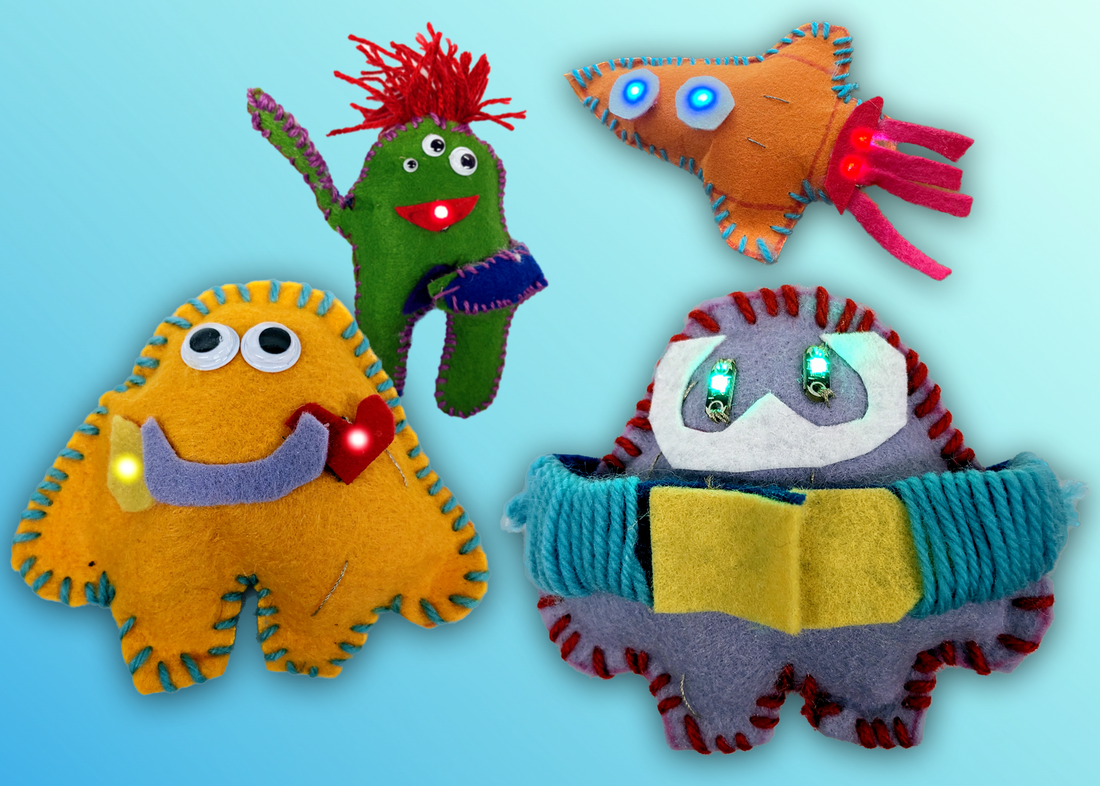
Colorful handmade felt monsters with stitched details and LED lights on a blue gradient background.
Soft-circuit felt funsters
Two metal cuff bracelets, one gold with engraved text and one blue with engraved science symbols, alongside three colorful round metal charms with engravings including 'I can do it', a microscope, and a chemical structure.
Hand-crank automata

Make by Hand

Maker projects with real crafting, textile, and shop tools

Get Making without screens! Do several hands-on Maker starter projects craft and shop tools. Measure, saw and drill to visualize data. Create 3D models out of 2D materials. Build your own hand-cranked mechanical automata. Use felt and conductive thread to light up some crafty creatures.

Five colorful 3D printed objects including a yellow hand with 'Need a hand?' text, a gray unicorn head, a lime green triangle with vegetables, a green dinosaur-shaped plaque, and an orange coin with an object design.
3D "hacks"
Close-up of a wooden stamp with a panda face and its stamped imprint on white paper.
Craft foam ink stamps
Three reflective acrylic plaques on a wooden surface with inscriptions: 'My past does not define me, My future is mine to create', 'Blessed & Thankful', and a plaque shaped like a building facade with '2023' on top.
Laser cut custom mirrors
Close-up of colorful 3D-printed puzzle pieces with raised patterns and shapes including a yellow boat and a purple double-hook.
3D Puzzle

Digital Fabrication

Maker projects with 3D printers, laser cutters and vinyl cutters

Demystify digital fabrication in 2D and 3D with hands-on Maker starter projects. Design and print quick and easy 3D creations with Tinkercad. Use a Cricut vinyl cutter to create customized etched glassware. Laser-cut a personalized mirror with a Glowforge laser cutter.

Handmade cardboard models of a yellow Pikachu with visible wiring and a blue fish with green LED lights on a white background.
Tilt-Buzz
"A" Quality Quiz board showing a musical staff with four triads and movable pointers labeled 'Quality' and 'Chord' to match triads with chord qualities major, minor, diminished, and augmented.
Light-up Quiz Board
Two glowing paper cutouts lit from below, one shaped like a building and the other like a star, on a dark surface.
Festive Flashlights

Electronics

Light up learning with simple electronics Maker projects

Harness the power of electricity with hands-on Maker starter projects. Craft custom quiz boards that light up. Bring to life a cut-out character that buzzes and blinks. Use Tinkercad to prototype and simulate electronic circuits. Cast creative shadows with festive flashlights.

A DIY automatic plant watering system with a pink paper flower, two water containers, a microcontroller, and connected wires on a yellow base labeled 'Auto Plant Waterer'.
Automatic plant waterer with micro:bit
Two segmented, wiggly toy snakes, one light green with bumps and one dark green, on a white background.
Wiggly snake made with Codeblocks
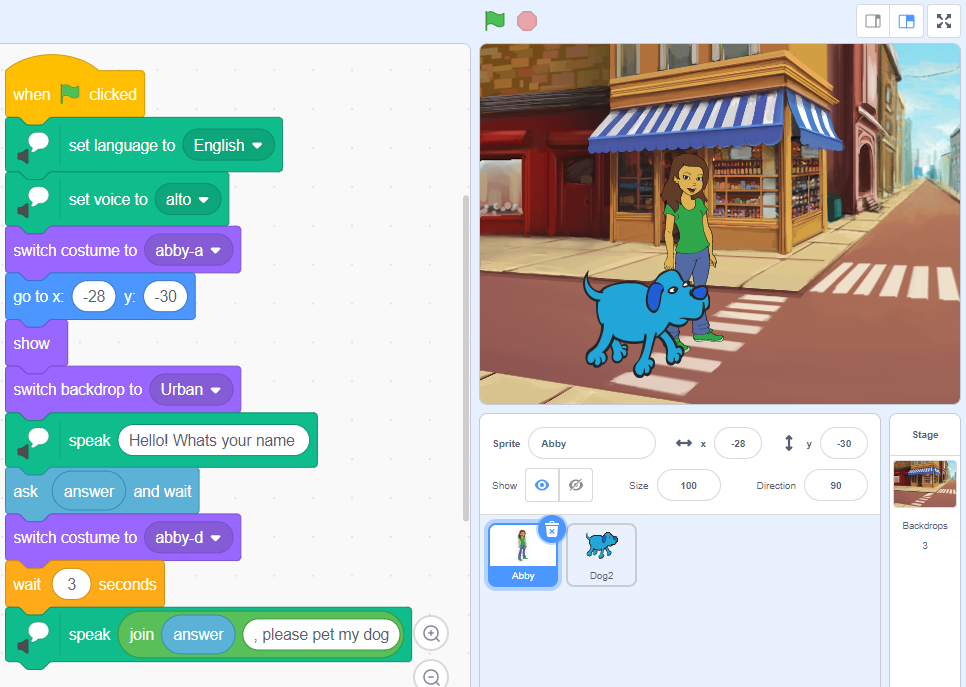
Screenshot of a Scratch project with coding blocks on the left and a stage on the right showing a cartoon girl and a blue dog at an urban crosswalk.
Interactive Storytelling with Scratch

Physical Computing

..Maker projects that bring code into the real world

​Scratch? Micro:bit? Codeblocks? What platforms should I use, when do I use them, and how?! Get your students into computer science in physical, fun way with a variety of tools  that connect code to the world we live in. Make 3D models from code with Tinkercad Codeblocks. Get your game on with micro:bit. Tell interactive stories with Scratch.

Frequently Asked Questions

How do I register?

Registration and payment processing is done on the Edgerton Center main website. The link to register will be posted above - if registration is not available yet, sign up for our newsletter to be notified when it opens.

How long are workshops?

Unless otherwise specified, all workshops run from 9:00am-3:00pm, with a 30 minute lunch break.

What do the workshops cost?

For each one-day workshop, we charge $325/person, payable by credit card, check or purchase order.

What's the class size?

We try to keep the class sizes small - typically limited to under 20 participants.

I just missed a workshop - when is the next one?

Subscribe to the K-12 Maker Newsletter to be the first to know when new workshop dates are added.

Can I sign up for just one?

Yes! For one-day workshops, take only the courses you want - and take as many as you want.

Where are the workshops?

We run our in-person workshops at the Edgerton Center Student Project Lab on the 4th floor of building 4, room 4-409. Get directions and parking info from our Contact page. New remote-learning opportunities are coming soon!

I'm just starting out - can I still come?

Workshops are designed with beginners in mind. Past participants have had resources ranging from portable carts to library Makerspaces to full-blown shops - and if you don't have a Makerspace yet, we are here to help!

Are my students old enough for Making?

The workshops we offer were originally designed for teachers of students from grades 4 – 12, but students can start making in any grade. Many of our past participants teach grades K-5.

Is lunch included?

No, but we do offer light snacks throughout the day. There are a few good places to buy a meal within a 5 minute walk, and we have a kitchenette with fridge, toaster oven, and microwave for people who prefer to bring lunch.

Are there scholarships?

Our workshop fees help to support online and other resources that we provide for free, so we are unable to offer scholarships at this time. Some participants have been able to fund workshop fees from their school district, PTA, school educational foundation for teacher PD, or local university programs.

What do people like about your workshops?

Our staff members are experienced educators, passionate about the opportunities that maker technologies brings to the classroom. We emphasize hands-on practice and teach each technology through a simple maker project. Participants will leave with confidence, skills, resources, and new ideas for incorporating Maker tools into the classroom.  Here's what past participants say:

Will you come to our school / district?

Maybe! Contact us or see PD Packages for more details.​

What past participants are saying

"The willingness of the presenters to go above and beyond to ensure that I got the most out of the program was refreshing. They are very genuine and passionate."
“Walking through a project together, rather than just talking about a project.”
"Hands on - met us where we were at. The staff to participant ratio was awesome. Often in these types of settings, you wait a lot for help. This was really well planned out."

Still have questions?

Red wax seal with "MAKE" stamp on envelope icon.

Get the K-12 Maker Newsletter

Don’t miss the latest news, project ideas, PD opportunities, insights, and more!

Sign up
read past issues